


Download Bookmash – Free Video, Music & Photo Downloader
Overview
Bookmash arrives at a time when the sheer volume of online media can feel overwhelming. The AIR‑based application consolidates the most popular video, music, and photo sources into a single, visually appealing environment that mimics the fluidity of Apple’s Cover Flow. Instead of hopping between YouTube, Vimeo, SoundCloud, Flickr, and dozens of social networking sites, users can glide through thumbnail galleries that represent the newest uploads across these platforms.
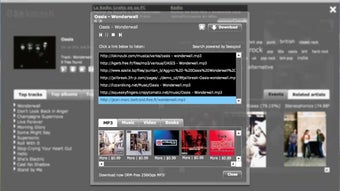
The interface is deliberately lightweight in terms of navigation – a simple drag‑and‑drop motion reveals the next set of items, while smooth animations keep the experience engaging without feeling gimmicky. Once a piece of content catches the eye, Bookmash offers an instant “download” button, allowing videos, images, and audio tracks to be saved directly to the local hard drive. The video files are delivered in their native FLV format, which means a compatible Flash player is required for playback; however, the application automatically detects and suggests a suitable player if none is present.
While the social‑news integration is limited to opening external links in the default browser, the core media browsing and downloading features are robust enough to make Bookmash a valuable hub for anyone who spends a significant portion of their day consuming online content. The primary drawback lies in its resource consumption – the rich animations and simultaneous network requests can be taxing on older machines. Nevertheless, for power users on modern hardware, Bookmash delivers a consolidated, secure, and relatively fast way to stay on top of the latest media trends without juggling multiple tabs or applications.
Key Features
- Unified Thumbnail Gallery: Browse the newest videos, music tracks, and photos from multiple sites in a single, scrollable interface.
- One‑Click Download: Save FLV videos, MP3 audio, and high‑resolution images directly to your computer with a single click.
- Animated Cover‑Flow Navigation: Drag thumbnails left or right to explore content, with smooth transitions that keep the experience fluid.
- Cross‑Platform Support: Runs on Windows, macOS, and any system with Adobe AIR installed, making it accessible to a broad audience.
- Automatic Player Detection: If an FLV player is missing, Bookmash prompts you to install a compatible player, reducing setup friction.
- Customizable Sources: Users can add or remove source feeds, tailoring the gallery to favorite sites like YouTube, Vimeo, SoundCloud, Flickr, and more.
- Resource‑Aware Caching: Cached thumbnails are stored locally to speed up subsequent browsing while limiting memory usage.
- Secure Download Engine: All files are retrieved via HTTPS when available, protecting users from man‑in‑the‑middle attacks.
- Regular Updates: The development team releases frequent patches to keep up with API changes from integrated services.
- Lightweight Settings Panel: Adjust refresh intervals, download directories, and animation speed without navigating away from the main view.
Installation & Usage Guide
Getting started with Bookmash is straightforward, even for users who are new to Adobe AIR applications. First, visit the official Bookmash website and click the “Download for Windows” or “Download for macOS”
button, depending on your operating system. The installer is a single .air package that
contains all necessary libraries.
If you do not already have the Adobe AIR runtime installed, the
installer will prompt you to download it – this is a free, lightweight framework that enables the
application to run on any supported platform. Once the runtime is in place, run the .air
file and follow the on‑screen instructions: accept the license agreement, choose an installation
directory (the default is usually fine), and let the installer copy the files. The entire process
typically takes under two minutes on a modern computer.
After installation, launch Bookmash from the Start menu (Windows) or the Applications folder (macOS). The first time you open the program, you will be greeted by a brief tutorial overlay that explains the main navigation gestures. To begin browsing, simply hover over any thumbnail; a preview pane will appear, showing a short description and the source website.
Drag the thumbnail left or right to scroll through the gallery. If you find a video you’d like to keep, click the red “Download” icon that appears in the lower‑right corner of the thumbnail. Bookmash will automatically start the download and display a progress bar in the bottom status area.
Completed files are saved to the default “Bookmash Downloads” folder, though you can change this location at any time via the Settings panel (accessible via the gear icon in the top‑right corner).
For audio tracks, the process is identical – a single click saves the MP3 file. Photo downloads work similarly, and you can choose to retain the original resolution or request a compressed version to save disk space. If a video requires an FLV player, Bookmash will check your system for an installed player; if none is found, a non‑intrusive dialog offers a direct link to a trusted free player such as VLC or the Adobe Flash Player. The application also supports keyboard shortcuts: Space pauses or resumes a download, ← and → navigate the gallery, and Ctrl+D triggers a quick download of the highlighted item. These shortcuts speed up the workflow for power users who prefer a keyboard‑centric approach.
Finally, keep an eye on the “Updates” tab in the Settings panel. Bookmash checks for new source feeds and software patches every 24 hours. When an update is available, a discreet notification appears, and you can install the update with a single click, ensuring you always have the latest features and compatibility fixes.
Compatibility & System Requirements
Bookmash is built on Adobe AIR, which means it runs on any operating system that supports the AIR runtime. Officially supported platforms include:
- Windows 7, 8, 10, and 11 (64‑bit) – Requires Adobe AIR 33.1 or later.
- macOS 10.12 Sierra and later – Native .app bundle with bundled AIR runtime.
- Linux (experimental) – Works with the open‑source AIR implementation, though performance may vary.
Minimum hardware specifications are modest, reflecting the lightweight nature of the core application:
- Processor: 1 GHz or faster (dual‑core recommended for smoother thumbnail animation).
- RAM: 2 GB minimum; 4 GB or more is advisable for heavy browsing sessions.
- Disk Space: 150 MB for the application itself plus additional space for downloaded media.
- Graphics: DirectX 9‑compatible GPU or OpenGL 2.0 for hardware‑accelerated animations.
- Internet Connection: Broadband (minimum 3 Mbps) for rapid media retrieval.
While Bookmash can run on older machines, users may notice slower thumbnail loading or occasional stuttering during intensive browsing. Updating graphics drivers and ensuring the latest version of Adobe AIR is installed can mitigate most performance concerns. The application also offers a “Low‑Power Mode” in the Settings panel, which disables some visual effects to conserve CPU and memory resources.
Pros and Cons
Pros
- All‑in‑one gallery consolidates multiple media sources, saving time.
- One‑click download of videos, music, and photos with automatic file organization.
- Slick Cover‑Flow navigation makes browsing intuitive and visually appealing.
- Cross‑platform support via Adobe AIR ensures broad accessibility.
- Secure HTTPS downloads protect user privacy.
- Regular updates keep the software compatible with changing APIs.
- Customizable source feeds let users tailor the experience to personal preferences.
- Built‑in detection for required FLV player simplifies video playback setup.
Cons
- Resource‑heavy animations can slow down older computers.
- Videos are saved in FLV format, requiring an additional player for many users.
- Social‑news integration only opens external links in a browser, limiting in‑app interaction.
- Reliance on Adobe AIR, which some users may consider outdated.
- Limited offline browsing; content must be streamed to view thumbnails.
Frequently Asked Questions
Is Bookmash free to download and use?
Yes, Bookmash is completely free. You can download, install, and use the application without any hidden fees or subscription requirements. Optional donations are accepted to support ongoing development.
Which video formats does Bookmash support for download?
Bookmash downloads videos in their native FLV format from sites that provide Flash‑based streams. If you need a more common format like MP4, you can use a third‑party converter after the download.
Do I need an Adobe AIR license to run Bookmash?
No. Adobe AIR is a free runtime that you can download from Adobe’s website. Bookmash bundles the required AIR version during installation, so you won’t need a separate license.
Can I customize which sources appear in the thumbnail gallery?
Absolutely. In the Settings panel you can add new RSS or API feeds, enable/disable existing ones, and even set a priority order so your favorite sites appear first.
Is Bookmash safe to use with regard to malware or unwanted software?
Yes. Bookmash only downloads media files from reputable sources and uses HTTPS whenever possible. It does not install any third‑party plugins or adware. Always download the installer from the official website to avoid counterfeit versions.
Conclusion – Should You Download Bookmash?
In an age where media consumption is fragmented across countless platforms, Bookmash offers a compelling solution that brings videos, music, and photos together under a single, attractive interface. Its one‑click download capability, customizable source feeds, and smooth Cover‑Flow navigation make it a valuable time‑saver for power users, content creators, and anyone who simply wants to stay current with the latest online media. While the application does lean on system resources and requires an FLV player for video playback, these trade‑offs are outweighed by the convenience and security it provides. If you’re looking for a free, secure, and regularly updated tool that centralizes your favorite media sites, Bookmash is definitely worth a try.
Ready to streamline your media browsing experience? Download Bookmash now and start enjoying a unified view of the internet’s newest videos, songs, and photos—all from a single, elegant application.







